AINoter Documentation
Welcome to the official AINoter user guide. AINoter is a lightweight prompt manager for macOS that helps you build your prompt library and instantly access prompts from any application.
Whether you're working with ChatGPT, Claude, or other AI assistants, AINoter streamlines your workflow by keeping all your prompts one hotkey away. This documentation covers everything you need to get started and make the most of the app.
What you'll learn
- • Creating and editing prompts
- • Organizing prompts with folders and tags
- • Setting up global hotkeys for instant access
- • Using Inspector to manage item details
- • Editing prompts with Markdown preview modes
- • Exporting prompts to PDF, with page breaks • Finding and replacing text inside the current prompt
- • Using Quick Access Window from any app
- • Backing up and restoring your prompt library
Create a prompt
- 1 Click + in the top bar.
- 2 Enter Name.
- 3 Click ✓ to save. Cancel — X.
- 4 Open the prompt and add content in the Editor.
Create a folder
Folders help keep prompts organized.
- 1 Click the button in the top bar.
- 2 Enter Folder Name.
- 3 Click Save.
Shortcuts
A shortcut lets you copy a prompt to the clipboard without switching windows.
Set a shortcut
- 1 Open a prompt (or create a new one).
- 2 In Prompt Inspector, in the Shortcut field, use Click to add shortcut.
- 3 When you see "Listening for shortcut…", press your key combination.
- 4 The shortcut is saved automatically.
Use a shortcut
- • Press the shortcut — the prompt text is copied to the clipboard.
- • Paste it where you need it.
Change or remove a shortcut
- • To change it: click the current Shortcut, then press a new key combination.
- • To remove it: click X next to the shortcut.
Shortcut requirements
These requirements apply to prompt shortcuts and the Quick Access Window hotkey.
- • Include at least one modifier: Command, Control, Function, or Shift.
- • Do not use Option as the only modifier. Combine Option with Command, Control, or Function.
- • Do not use navigation, editing, or confirmation keys as the main shortcut key. Use a letter, number, or symbol instead.
- • Do not use a shortcut that is already assigned in AINoter or reserved by macOS as a standard system shortcut.
Inspector
Inspector is the right-side panel that shows details for the selected item.
Prompt Inspector
- • Name — the title of your prompt.
- • Notes — a place to keep your own notes related to the prompt.
- • Shortcut — lets you quickly copy the prompt. See Shortcuts.
- • Tags — lets you organize and filter prompts across folders. See Tags.
- • Created at — shows when the prompt was created.
Folder Inspector
- • Name — the title of your folder.
- • Created at — shows when the folder was created.
Editor
Editor is where you write and edit prompt content. Changes are saved automatically as you edit.
How to use
- 1 Open any prompt from the list.
- 2 Edit the prompt text in the editor area.
Font size
Use Command + and Command - to increase or decrease the editor font size.
Markdown
AINoter supports Markdown for prompts that need structure, examples, checklists, tables, links, code blocks, math, or diagrams.
View modes
- • Text — edit the raw Markdown text.
- • Text + Preview — edit Markdown and view the rendered result side by side; the preview follows the editor as you scroll.
- • Preview — read the rendered prompt without the raw Markdown editor.
Supported formatting
Use standard Markdown syntax for headings, lists, links, tables, inline code, and fenced code blocks. GitHub-flavored extensions also work, including task lists, footnotes, definition lists, and strikethrough.
Code highlighting and themes
Fenced code blocks are syntax-highlighted in the preview when you add a language name (for example swift, python, or bash), and each block has a copy button. You can pick the code color theme in Settings → Editor — GitHub, One, VS Code, Catppuccin, Solarized, or Night Owl — and each theme has light and dark variants that follow the system appearance.
Math and diagrams
Write LaTeX math with $…$ or \(…\) for inline formulas and $$…$$ or \[…\] for display math. Add a fenced mermaid code block to render a flowchart, sequence diagram, or other Mermaid diagram in the preview.
Export to PDF
From the preview you can export the rendered prompt — including diagrams — to a PDF file. The export uses a light theme so it stays legible on white.
Page breaks
Put \newpage (or \pagebreak) on its own line to force a page break in the exported PDF. In the preview the break is shown as a dashed line so you can see where the page will split.
Find in Prompt
Find in Prompt searches inside the currently opened prompt. It is separate from the global search that filters your prompt library.
How to use
- • Open the find bar in the editor and type the text you want to find.
- • Use the match count and previous or next controls to move through results.
- • Use Replace when you need to update matching text in the current prompt.
- • Click Done to close the find bar.
Quick Access Window
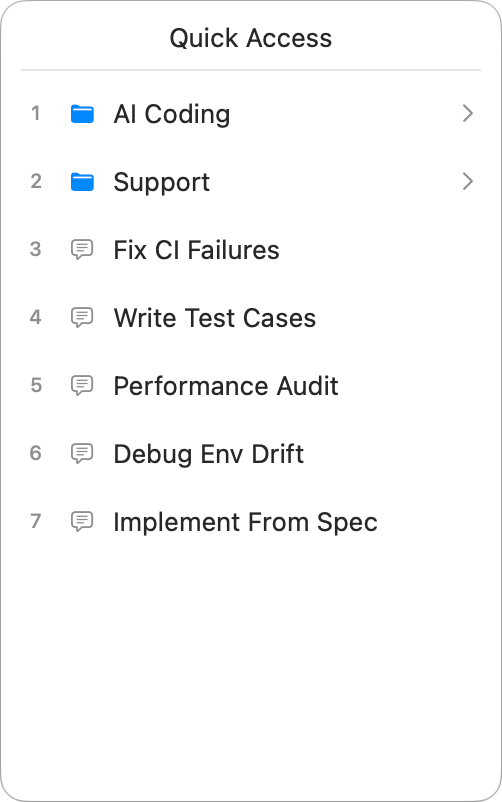
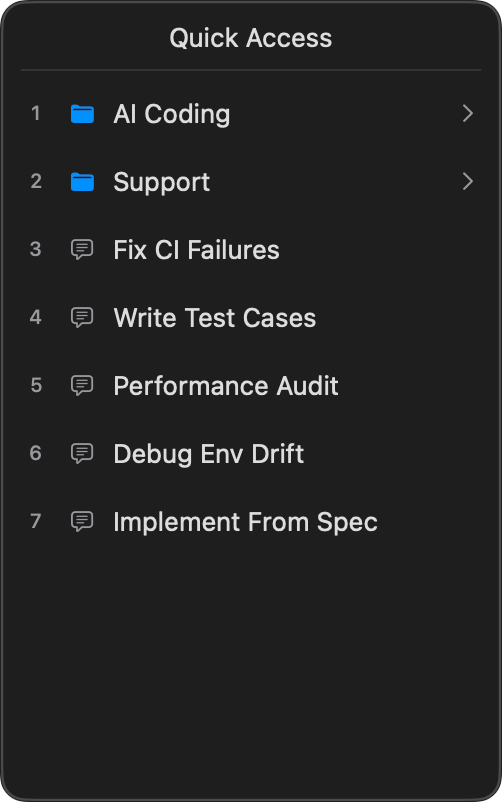
Quick Access Window is a floating window for copying prompts, which you can open outside the app (from any window) using a hotkey.
How selection works
- • Select a folder → it opens.
- • Select a prompt → it's copied to the clipboard, and the window closes.
Mouse
Click the item you need in the list.
Keyboard
- • Press 1–9 to select one of the first 9 items in the list.
- • Number keys are fixed and can’t be customized.
- • The same action is performed as with a mouse click.
Order
- • The list order matches your Sidebar.
- • To change what appears first, reorder prompts and folders in the main window.
- • The Quick Access Window list can’t be rearranged separately.
Hotkey to open Quick Access Window
You can set the hotkey in Settings → Quick Access Window.
Settings
Settings are organized into dedicated pages available from the Sidebar navigation.
- • General • Editor
- • Quick Access Window
- • Menubar
- • Backup
General
In Settings → General, you can set the app appearance.
Editor
In Settings → Editor, you can adjust text appearance in the main editor.
- • Font — choose a typeface that fits your reading and writing style.
- • Font Size — increase or decrease text size for comfort.
- • Line Height — adjust spacing between lines to improve readability.
- • Code Theme — pick the color theme used for code blocks in the Markdown preview.
Quick Access Window
In Settings → Quick Access Window, you can set the hotkey used to open the Quick Access Window. This hotkey follows the same shortcut requirements.
Menubar
In Settings → Menubar, you can control menu bar behavior.
- • When app is active — the menu bar item is visible only while the app is open.
- • Always — the menu bar item stays visible even after closing the app.
Backup
Backups are saved copies of your prompts and folders. They help you restore data if something was deleted or changed.
Location: Settings → Backup.
Automatic backups
Turn on Automatic backups — AINoter will create backups automatically.
Create a backup manually
Click backup — a new backup appears in the list with its date and time.
Restore from a backup
- 1 Find the backup you need in the list.
- 2 Click restore next to it.
Delete backups
- • Delete one backup: click delete next to it.
- • Delete all backups: click delete all.
Frequently Asked Questions
How do I set a shortcut for a prompt?
How do I create a folder?
How do I organize prompts?
How do tags work?
How does Quick Access Window work?
How do I search prompts?
How do I search inside the current prompt?
How do I use Markdown preview?
How do backups work?
Need More Help?
Contact us: support@bscoders.com